This blog aims to provide DevOps Developers with a clear and practical introduction to DevOps, covering its core principles, culture, tools, and workflows. It will explain how DevOps bridges the gap between development and operations, enables faster and more reliable software delivery, and helps developers adopt practices such as Continuous Integration (CI), Continuous Delivery (CD), automation, monitoring, and collaboration to build high-quality applications more efficiently.
The Code to Production Gap
A common conceptual hurdle for developers moving into full-stack or DevOps infrastructure is understanding how code translates from a local GitHub repository to a live, highly available production server. Modern applications for both frontend (FE) and backend (BE) are frequently written entirely in TypeScript. However, the mechanism by which they are deployed and executed in production couldn’t be more distinct.
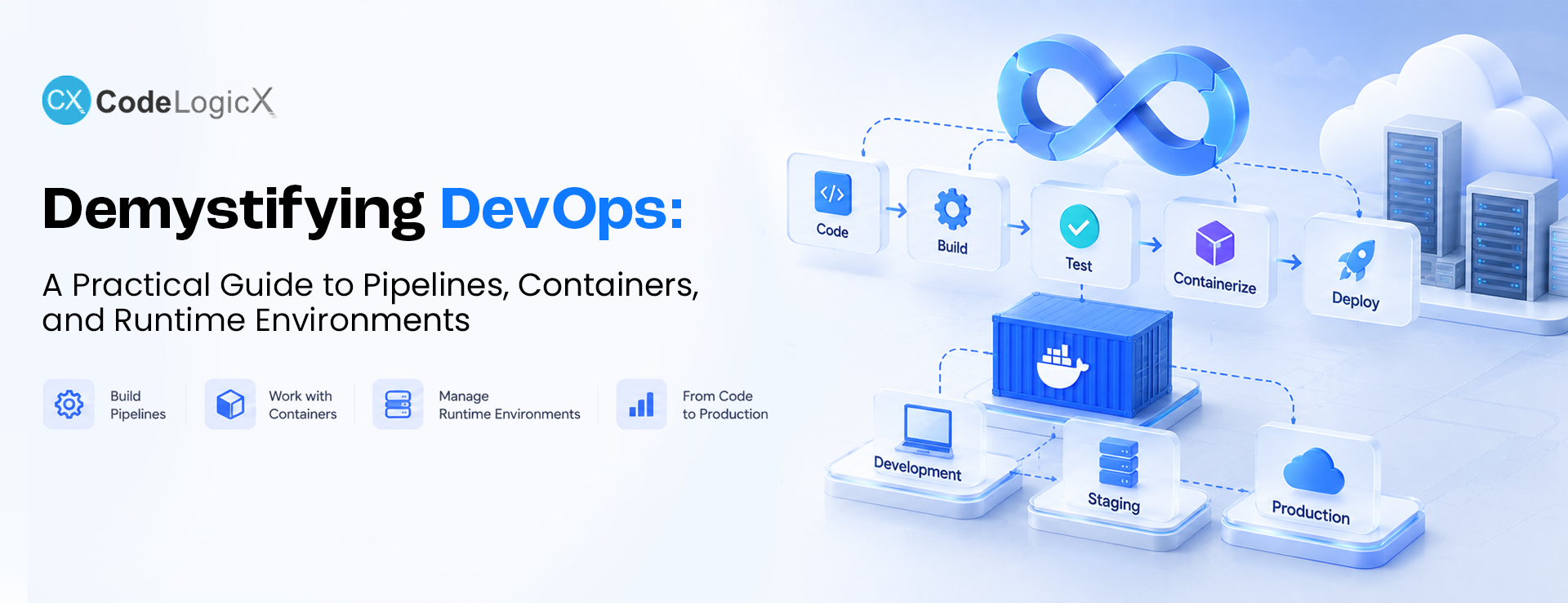
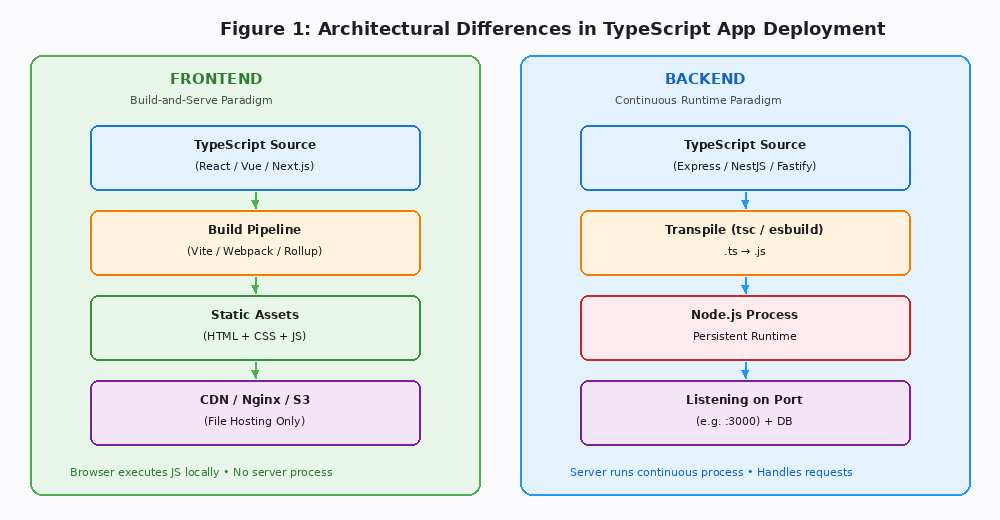
Browsers cannot natively execute raw TypeScript, and servers cannot reliably run raw development processes without crashing. To bridge this gap, modern CI/CD pipelines split deployment architectures into two distinct paradigms: The Build-and-Serve model for the frontend, and the Continuous Runtime model for the backend.
Let’s have a look at the Architectural Differences in TypeScript App Development!
Frontend Delivery: The Build-and-Serve Paradigm
When deploying a frontend application (such as React, Vue, or Next.js static exports), we are not launching a persistent computational process on a cloud server. Instead, the deployment is entirely driven by a build sequence.
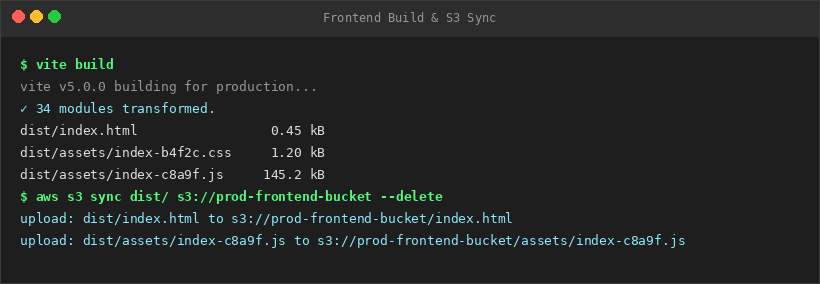
During the CI/CD pipeline, the TypeScript source code undergoes a compilation, minification, and bundling phase utilizing tools like Webpack, Vite, or Rollup. The pipeline strips away TypeScript typing and generates a finalized directory of highly optimized, static assets: HTML, CSS, and vanilla JavaScript. These static files are simply transferred to a web server (like Nginx) or a global Content Delivery Network (CDN, like AWS CloudFront or Vercel).
Terminal Output: Frontend Build and Sync Execution
FRONTEND DEPLOYMENT REALITY:

A deployed frontend application does not require a continuous running Node.js 'process' on the backend infrastructure. The server acts purely as a file host, handing the static JavaScript to the user's browser, where the actual execution and rendering occur locally.
Backend Execution: The Continuous Runtime Paradigm
Unlike the static frontend, a backend application (such as an Express, Fastify, or NestJS API) must actively listen for incoming HTTP requests, process intensive business logic, and broker connections to databases. Even though the backend is authored in TypeScript, it runs directly as executing code but it must be executed as JavaScript.
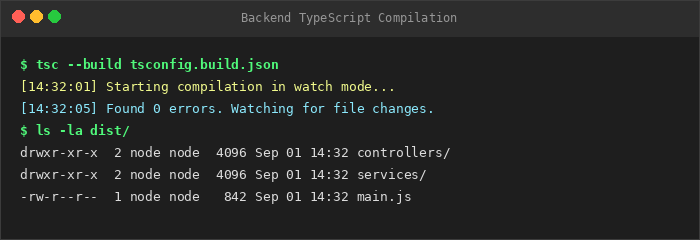
Because the standard Node.js runtime natively understands vanilla JavaScript, the deployment pipeline first transpiles the `.ts` files down to `.js` using compilers like `tsc` or `esbuild`. Once transpiled, the application is launched inside a server environment. This requires a persistent, long-lived process actively listening on a network socket (e.g., Port 3000).
Terminal Output: Backend Transpilation Output
Sustaining the Backend: PM2 vs. Docker Containers
To ensure a backend process remains continuously active, automatically restarts upon crashes, and survives server reboots, DevOps engineers leverage process management systems. The two dominant operational models are bare-metal execution via PM2, and containerized isolation via Docker.
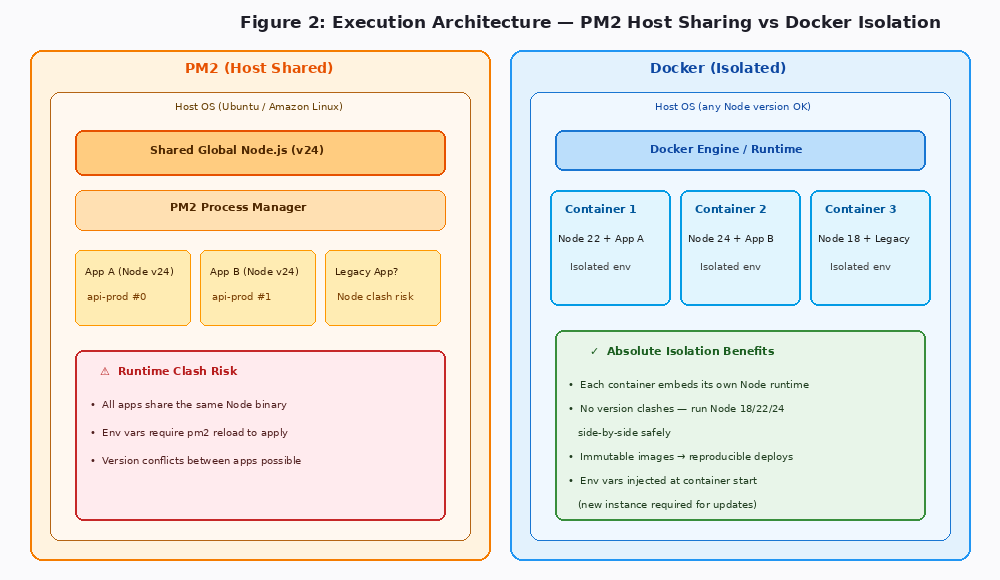
PM2 (Process Manager 2)
PM2 is a production process manager built for Node.js applications running directly on a host server’s operating system (such as Ubuntu or Amazon Linux). Executing an app via PM2 means running the JavaScript files natively on the host machine using the globally installed Node.js binary.
Terminal Output: PM2 Cluster Start and Status
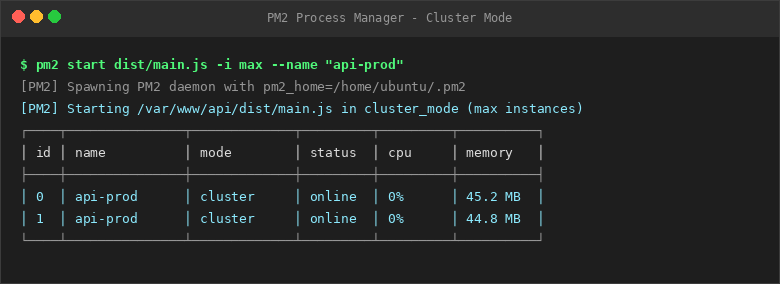
The Node Runtime Clash Vulnerability:
The application relies entirely on the host server’s shared environment. For example, if you install Node.js v24 globally on your host machine to run a modern application but lately try to deploy a legacy application that explicitly requires Node v22, a runtime clash will occur. You cannot easily run both native Node versions simultaneously for different PM2 processes without implementing complex external version managers.
Environment Variable Injection (PM2):
In a PM2 architecture, environment variables (like database passwords or API keys) are injected into the process at the exact moment the application starts. If an environment variable is updated (e.g., in a `.env` file), the application will not register automatically. You must execute a PM2 restart command (`pm2 reload api-prod`) for the new variables to be injected into the application’s memory.
B. Docker Containers
Docker fundamentally reconstructs application execution. Instead of relying on the host server’s global environment, Docker packages the application code, the exact Node.js runtime version required, and all critical system-level OS dependencies into a single, immutable artifact known as a Container Image.
Terminal Output: Docker Image Build and Container Execution
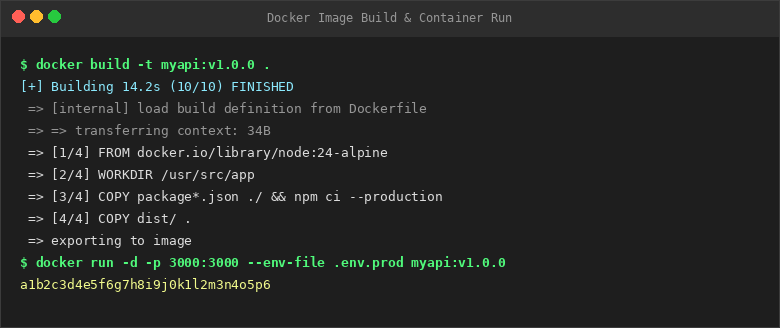
Absolute Node Runtime Isolation:
A Docker container spins up as a deeply isolated mini environment. The container operates completely independently of the host server’s global Node version because it brings its own embedded runtime. For example, if your host server is running Node v24, but your containerized application requires Node v22, the Docker image simply bundles its own internal Node 22 runtime. The application will execute flawlessly inside the container, completely unaware of the Node v24 installation running outside on the host.
Environment Variable Injection (Docker):
Similar to PM2, Docker containers ingest environment variables strictly at startup (often passed via `-e` runtime flags or specific env files). However, because containers are immutable by design, you cannot simply ‘restart’ the exact same container state to pick up new variables. To update environment variables in Docker, you must actively stop the existing container, destroy it, and spin up a brand-new container instance injecting the newly updated environment variables during boot.
THE ARCHITECTURAL DIFFERENCE: PM2 manages your application process within the server's shared ecosystem. Docker manages the entire ecosystem alongside your application process, achieving total runtime isolation and eliminating environmental drift.
Observability: Application Logs vs. Flow Logs
Deploying the application successfully is only the first phase. Once the application is live, developers must monitor two distinct layers of telemetry: the internal code execution (Application Logs) and the network traffic reaching the server (Flow Logs).
A. Application Logs (Internal Code Diagnostics)
Application logs are generated directly by your code (e.g., `console.log()` or logging libraries like Winston/Pino). Depending on your deployment strategy, you retrieve these logs differently:
Terminal Output: Fetching Application Logs (PM2 vs Docker)
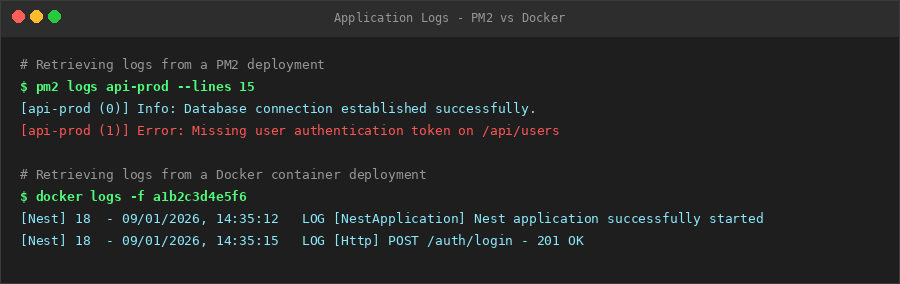
B. Network Flow Logs (Infrastructure Diagnostics)
If your application is running, but users cannot reach it, application logs won’t help because the request never hits your code. This is where VPC Flow Logs (Virtual Private Cloud Flow Logs) become critical. Flow logs record all IP network traffic going to and from network interfaces in your cloud infrastructure (like AWS or GCP).
A flow log tells you the source IP, destination port, the protocol, and crucially, whether the firewall (Security Group) ACCEPTED or REJECTED the traffic.
Terminal Output: AWS VPC Flow Log Output Analysis
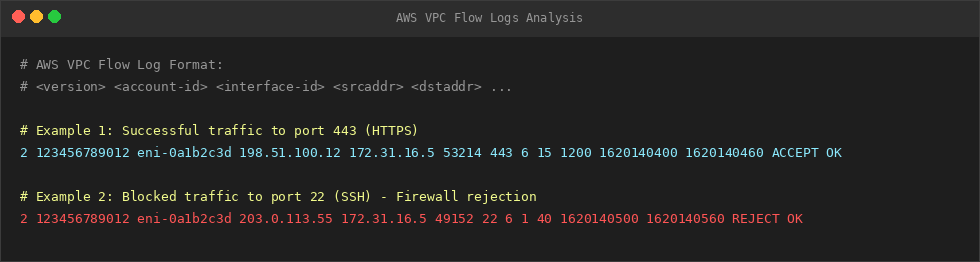
WHY FLOW LOGS MATTER: If a frontend application cannot reach the backend API, developers often check the backend code. If the application logs are completely empty, check the Flow Logs! An 'ACCEPT' means the request reached the server; a 'REJECT' means the cloud firewall blocked it before your code even knew it existed.
Conclusion
Mastering the deployment lifecycle empowers developers to engineer significantly more resilient systems. Recognizing that frontends are built into immutable static assets and served, while backends are transpiled to JavaScript and actively sustained as persistent processes, demystifies the CI/CD pipeline. Furthermore, graduating from host-dependent managers like PM2 to isolated, immutable Docker containers and learning to diagnose issues across both application and network flow logs marks the definitive transition from basic server administration to advanced, cloud-native DevOps engineering.
Mastering the deployment lifecycle empowers developers to engineer significantly more resilient systems. Recognizing that frontends are built into immutable static assets and served, while backends are transpiled to JavaScript and actively sustained as persistent processes, demystifies the CI/CD pipeline. Furthermore, graduation from host-dependent managers like PM2 to isolated, immutable D ker