This blog aims to share the lessons learned from a deceptively simple security remediation task that turned into a three-day investigation across multiple layers of cloud infrastructure. Through the journey of disabling port 80 on a shared Application Load Balancer (ALB), uncovering a silent IAM role fallback, and identifying an overlooked health check dependency, readers will gain practical insights into troubleshooting complex AWS environments.
This content emphasizes the importance of understanding shared architecture, validating assumptions against actual deployments, and recognizing how small configuration changes can create unexpected downstream impacts.
Ultimately, it serves as a reminder that effective debugging is often less about fixing code and more about uncovering hidden relationships within modern cloud systems.
Let’s dive deep into the steps how two low-severity security issues exposed:
The Issue flagged during Penetration Testing:
It arrived as one of the least threatening items on the board. A penetration test had flagged two findings:
Insecure Ports in Use. Endpoints are reachable over plain HTTP on port 80.Requests are 301-redirected to HTTPS, but the initial connection is unencrypted.

Server Version Disclosure. HTTP responses expose Server:awselb/2.0,disclosing the load balancer technology.
Two fixes. One removes a listener. One sets a boolean. Both are documented by AWS in a single paragraph each. I estimated an afternoon.
This is what happened.
At first glance, this looked like routine security housekeeping.
The remediation plan was straightforward. One finding could be addressed by removing a listener. The other required flipping a boolean configuration value. AWS documentation covered both changes in a few short paragraphs. Nothing about the work suggested risk, complexity, or even much effort.
I estimated an afternoon, but the entire task consumed three days.
What began as two minor hardening changes led to the discovery of a production IAM misconfiguration that had been quietly active for 93 days. Along the way, a seemingly unrelated CloudWatch alarm started firing and triggered another investigation. That alarm, as it turned out, was tied to a health check that nobody had ever actually validated.
By the end of it, the penetration test findings were the easiest part of the entire exercise.
This is the story of how two low-severity security issues exposed a chain of assumptions hiding in plain sight, and why some of the simplest infrastructure changes can reveal the most interesting problems.
In this blog, we have segregated the blog in Different Acts for better understanding.
Act One: The Shared Load Balancer
The first fix looked trivial. In the Kubernetes Ingress manifest:
# Before
alb.ingress.kubernetes.io/listen-ports: '[{"HTTP": 80}, {"HTTPS":443}]'
alb.ingress.kubernetes.io/ssl-redirect: '443'
# After
alb.ingress.kubernetes.io/listen-ports: '[{"HTTPS":443}]'
Delete the redirect, drop the listener. Deploy. Done.
Except port 80 stayed open.
The reason was a single annotation I’d skimmed past:
alb.ingress.kubernetes.io/group.name: ingress-backend-group
The AWS Load Balancer Controller supports ingress groups. These multiple Ingress resources that are potentially across different namespaces and different Git repositories, merge into a single physical ALB. It’s an excellent cost optimization. It’s also a footgun if you don’t know it’s there.
The controller computes the union of every group member’s requirement. If any ingress in the group asks for port 80, the listener exists for everyone.
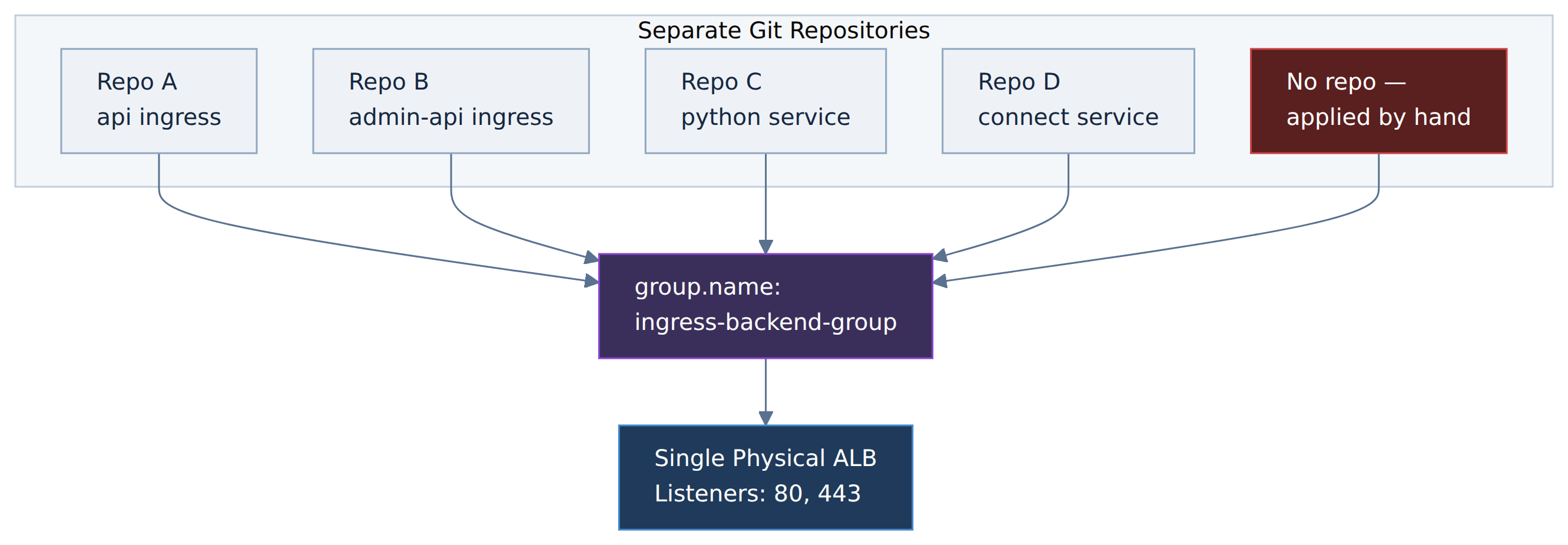
I had fixed one repository. There were four more and one ingress that existed in no repository at all, applied years earlier with kubectl apply and never captured in Git.
The lesson here is not “read your annotations.” It’s that infrastructure boundaries and repository boundaries are different things, and nothing in a code review will tell you that the file you’re editing shares state with four repos you’ve never opened.
Finding them required stepping outside Git entirely and asking the cluster:
kubectl get ingress -A -o json | jq -r '
  .items[] |
  select(.metadata.annotations["alb.ingress.kubernetes.io/group.name"] == "ingress-backend-group") |
  "\(.metadata.name)\t\(.metadata.annotations["alb.ingress.kubernetes.io/listen-ports"])"
One query, complete answer. I should have run it on the first day.
Act Two: The Silent Fallback
With every manifest corrected and deployed, port 80 still would not close.
The controller logs explained why, and the explanation was more interesting than the problem:
UnauthorizedOperation: You are not authorized to perform this operation.
User: arn:aws:sts::REDACTED:assumed-role/eksctl-...-NodeInstanceRole-.../i-...
is not authorized to perform: ec2:RevokeSecurityGroupIngress
Removing a listener also means revoking the corresponding security group rule. The controller tried, but AWS refused.
The interesting part is the principal. The controller was making that call as the EC2 node instance role the generic identity attached to the worker node not as its own dedicated IAM role.
This is the failure mode of IRSA (IAM Roles for Service Accounts). When IRSA is wired correctly, a webhook injects credentials into the pod at creation time:


The Critical Detailing:
There is no error when this fails. The AWS SDK credential chain is designed to fall through gracefully. IRSA credentials absent? Try environment variables. Absent? Try instance metadata. Something always answers. The pod starts, reports healthy, and runs indefinitely with the wrong identity until it attempts an operation the fallback role can’t perform.
In this case, that took 93 days.
The diagnosis includes three checks:
# 1. Is the annotation on the ServiceAccount?  (It was.)
kubectl get sa aws-load-balancer-controller -n kube-system \
  -o jsonpath='{.metadata.annotations.eks\.amazonaws\.com/role-arn}'
# 2. Does the IAM role have the permission?  (It did.)
aws iam get-policy-version --policy-arn <policy> --version-id <v>
# 3. Does the running pod actually have IRSA credentials?  (It did not.)
kubectl get pod <controller-pod> -n kube-system \
  -o jsonpath='{.spec.containers[0].env[*].name}' | tr ' ' '\n' | grep AWS
# → empty
Configurations are correct. Permissions correct. Running process wrong. The annotation had been added after the pod was created, and nothing had restarted it since.
Fixing it without a gap
The controller was running a single replica. A naive kubectl rollout restart would leave a window with no controller at all. Instead:
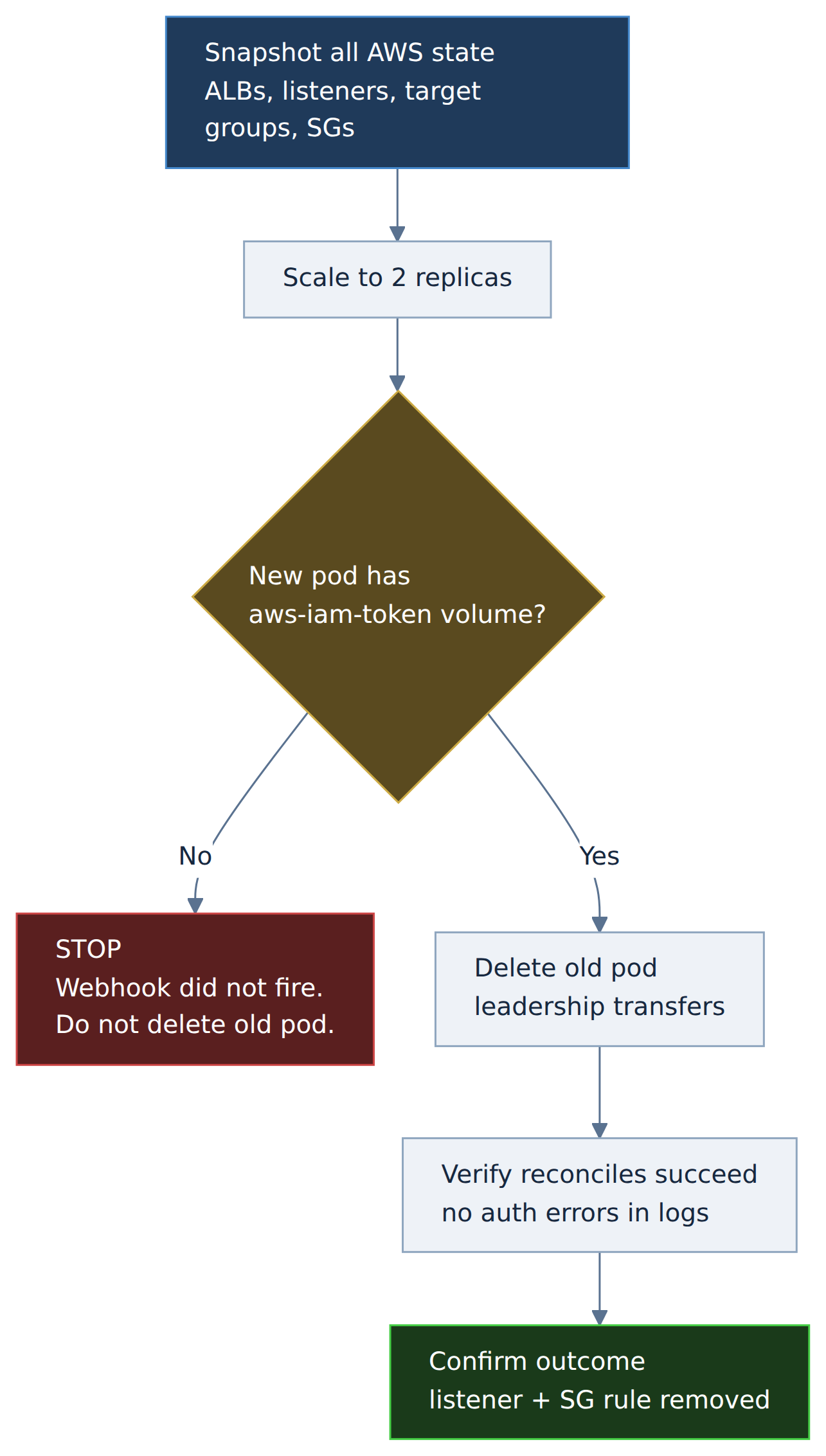
The explicit stop-gate matters. If the new pod comes up also lacking the token volume, the webhook isn’t firing and restarting again will not help. All you would just be cycling pods while the real problem sits elsewhere. Encoding “if this check fails, stop” into the runbook prevents the instinct to try again harder.
The restart worked. The controller assumed its correct role, reconciled, removed the listener, revoked the security group rule. It also silently fixed a second permission error nobody had reported the same fallback had been blocking AWS Shield subscription checks for the entire 93 days.
Act Three: Two Documentation Pages, One Truth
The second finding is- suppressing Server: awselb/2.0 — had a documented one-line fix:
routing.http.response.server.enabled = false
The question was where to put it. And this is where things got genuinely confusing, because AWS documents this attribute in two different places with two different APIs.
One page shows it set via modify-load-balancer-attributes. Another shows it under listener attributes, set via modify-listener-attributes. Both are official AWS documentation.
The first attempt placed it as a load-balancer attribute. AWS rejected it:
ValidationError: Load balancer attribute key
'routing.http.response.server.enabled' is not recognized
Worse, because the value was embedded in an Ingress annotation, the controller retried the rejected call on every reconciliation loop — and a failing reconcile blocks all other pending changes for that ingress group. The invalid attribute for finding §3.6 was actively preventing the fix for §3.5 from applying.
Two findings, tangled together by a shared reconciliation loop.
The resolution was to stop reading documentation and ask the environment directly:
aws elbv2 describe-listener-attributes --listener-arn <443-listener>
{
  "Key": "routing.http.response.server.enabled",
  "Value": "true"
}
There it was. A listener attribute, on this ALB, in this region, right now. No ambiguity, no interpretation.
When documentation conflicts, the environment is the source of truth. A describe-* call takes two seconds and settles arguments that documentation, blog posts, and automated code review cannot.
The controller version constraint
Knowing the correct placement didn’t mean it could be managed declaratively. The installed controller version predated support for the listener-attributes annotation — the correct annotation would simply be ignored.
So, three options existed:
| Approach | Works today | GitOps-managed | Self-healing |
| Load-balancer attribute annotation | No — API rejects it | | |
| Listener attribute annotation | No — controller too old | Yes | Yes |
| Direct CLI / console on listener | Yes | No | No |
The pragmatic choice was the third, with an explicit follow-up to upgrade the controller and migrate to the declarative path.
But applying configuration outside GitOps to a controller-managed resource raises an obvious question: will the controller revert it?
Rather than assume, I tested it. A throwaway annotation forces a full reconcile:
kubectl annotate ingress <name> reconcile-test="$(date +%s)" --overwrite
sleep 90
# re-check the attribute
kubectl annotate ingress <name> reconcile-test-
The value survived. Because the controller version doesn’t manage listener attributes at all, it leaves them untouched the same limitation that prevented the declarative fix also guaranteed the manual one would persist.
That’s a satisfying symmetry, but the important part is that it was verified rather than assumed. “It’ll probably be fine” is not a deployment strategy.
Act Four: The Alarm That Wasn’t Our Fault (But Looked Like It)
Days later, a CloudWatch alarm fired:
Production-API-NoHealthyTargets
HealthyHostCount < 1 for 2 datapoints
Zero healthy targets on a production API target group — and it belonged to one of the exact services I’d modified.
The obvious conclusion was that my change had broken it. The obvious conclusion was wrong, and the process of establishing that is worth more than the fix.
What the evidence showed:
Pods were 1/1 Running, 43 hours old, no restarts. The Kubernetes liveness probe was passing. But the ALB reported every target as:
Target.ResponseCodeMismatch: Health checks failed with these codes: [302]
Curling the application directly from inside the pod:
$ curl -sI http://localhost:3005/
HTTP/1.1 302 Found
Location: http://localhost:3005/public-api/docs
$ curl -sI http://localhost:3005/public-api/docs
HTTP/1.1 200 OK
The application redirects / to its doc’s page. It always has. The ALB health check targeted / and accepted only 200. That mismatch had existed since the service was deployed.
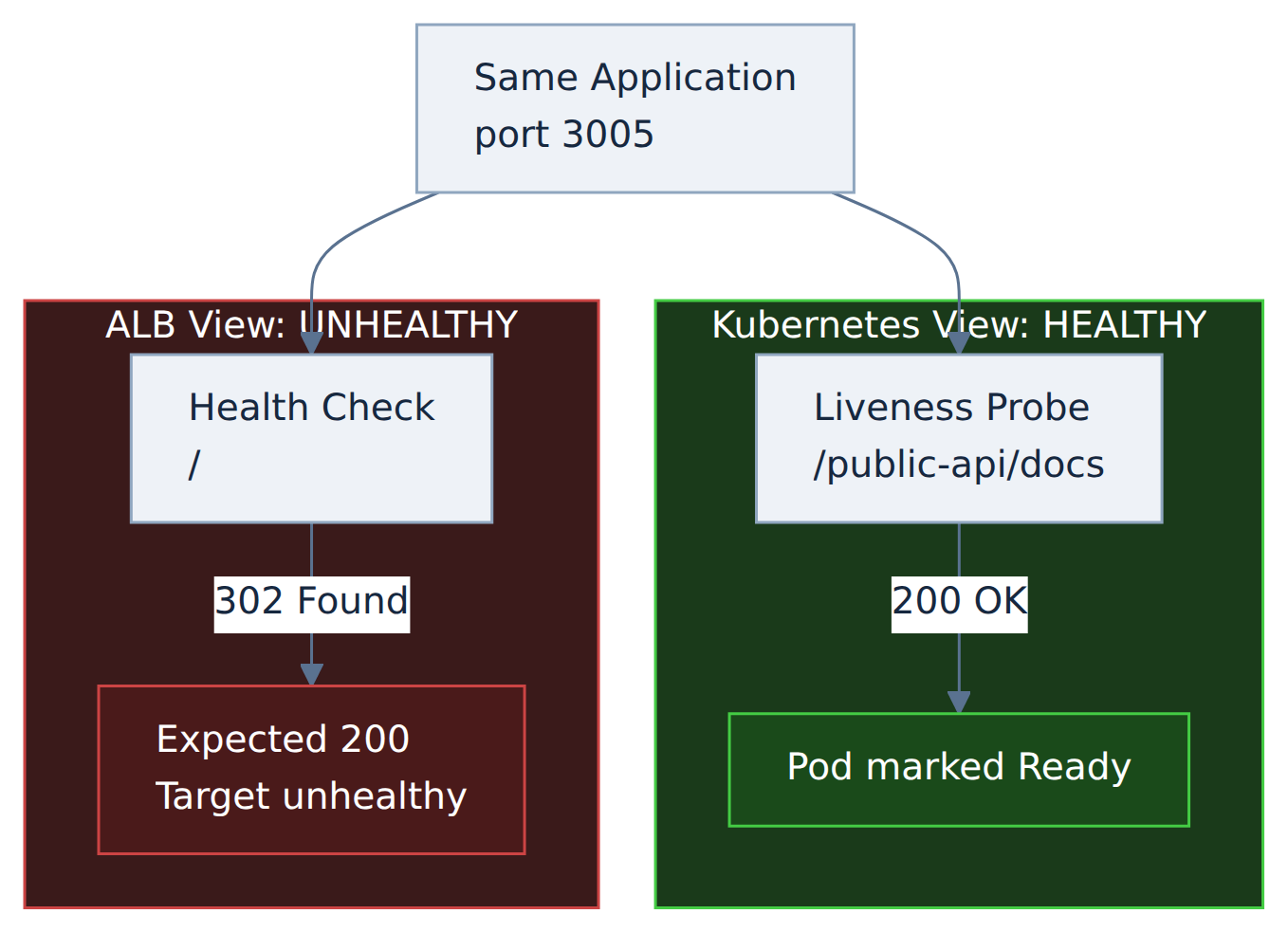
Two health checks, same application, opposite conclusions — because they probed different paths.
Now the question arises why it fired that day?
The alarm history showed INSUFFICIENT_DATA → ALARM with the reason “Unchecked: Initial alarm creation.” The alarm had been created that morning as part of a compliance monitoring rollout. The misconfiguration was old; the observation was new.
The fix was to align the ALB health check with the path the liveness probe already used and had already validated:
alb.ingress.kubernetes.io/healthcheck-path: '/public-api/docs'
Targets went healthy in under a minute.
There was a tempting shortcut here: set success-codes: “200,302” and move on. It would have cleared the alarm just as fast. But it would also mean the ALB considers a target healthy whenever anything responds with a redirect — including a broken application whose redirect middleware still works. The alarm would go quiet while the signal quality got worse.
Clearing an alert and fixing a problem are different objectives. They frequently have different solutions, and the faster one is usually the wrong one.
Let’s have a look at the Comprehensive Diagram:
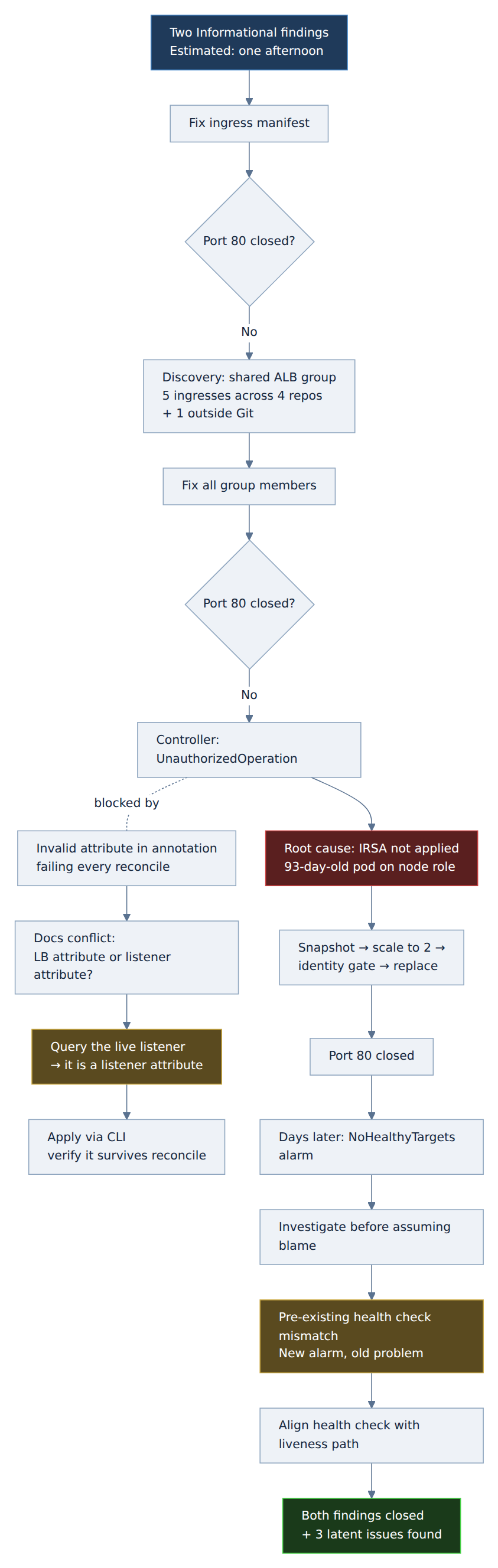
Few Important Anecdotes Which I Discussed with Myself Before Starting?
Map the blast radius before editing anything. A shared group.name means your one-file change has dependencies in repositories you haven’t opened. Query the live cluster for everything sharing that group before touching the first manifest.
A correct annotation is not a working configuration. IRSA annotations, node labels, and similar settings only take effect at pod creation. A configuration added after the pod started is invisible until something restarts. Verify the running process, not just the desired state — check for the token volume and the environment variables, not the annotation.
Silent fallbacks are the expensive kind of failure. The AWS credential chain is designed never to fail loudly. That’s convenient until it means a workload has been running with the wrong identity for three months. Anywhere a system has a graceful fallback, ask what happens when the primary path silently doesn’t work.
Query the environment before trusting the documentation. Vendor docs can be internally inconsistent. Automated reviewers can confidently state opposite things on consecutive passes. A single describe-* call is definitive for your account, your region, your resource, right now.
Test persistence for anything applied outside GitOps. If you must configure something imperatively on a controller-managed resource, force a reconcile and confirm it survives. Then document it with a re-apply procedure, because the next person will not know it exists.
Investigate before accepting blame. When an alarm fires shortly after your change, the correlation is suggestive but not conclusive. In this case a five-minute investigation showed a longstanding misconfiguration surfaced by a brand-new alarm. Had I assumed causation, I might have reverted a correct security fix to “resolve” an unrelated problem.
Every genuinely hard bug is at least two bugs. The port-80 change was blocked by an IAM issue, which was compounded by an invalid attribute from the other ticket poisoning the same reconciliation loop. Neither would have been especially difficult alone. Interleaved, each one obscured the other’s symptoms.
Conclusion:
The final diff across all of it is about a dozen lines. Two annotations changed, one deleted, one health check path corrected.
What produced those dozen lines was: enumerating an infrastructure boundary that didn’t match the repository boundary, diagnosing an identity fallback that had been silently active for three months, resolving contradictory vendor documentation empirically, and correctly declining to take the blame for an unrelated alarm.
The infrastructure was not broken. It was working exactly as configured. The configuration just encoded several assumptions that had quietly stopped being true and nothing in the system was designed to tell anyone.
That’s most of what infrastructure work is. The fix is rarely the hard part.